
The Best Car Insurance Apps
Compare top apps for claims, digital ID cards, savings, and ease of use. Find the right one for your needs.
Compare Quotes in 2 Minutes
Powered by:

 Secured with SHA-256 Encryption

Jane Taylor — Insurance Policy Expert
More drivers are turning to car insurance apps for convenience and to save money. Car insurance used to be a “set it and forget it” purchase: you picked a company, paid your bill, printed proof of insurance, and hoped you never needed anything else. Now, your insurance app is basically the control room for your policy. It’s where you file a claim after a crash, track roadside assistance, add a new car, download ID cards, make payments, chat with support, and sometimes even get discounts for safe driving.
But not all car insurance apps are created equal. Some are blazing fast with clean design and a smooth claims flow. Others feel like they were built in 2014 and never updated. Some companies split features across multiple apps, which is annoying when you’re stressed and just need help.
This guide breaks down the best car insurance apps by real-world usefulness: claims speed, digital ID cards, payments, policy changes, roadside assistance, safety/telematics options, and how well the app holds up when you actually need it. You’ll also get a simple checklist for choosing the right app for your needs – because the “best” app depends on whether you care most about quick claims, low prices, better driving discounts, or managing multiple cars and drivers.
What Makes a Car Insurance App “The Best”
Before we get into the top apps, let’s define what matters. A truly great insurance app does five things extremely well:
- It helps you prove coverage instantly. Digital ID cards should be easy to find, load quickly, and be shareable (email/text) without a maze of menus.
- It makes paying and managing your policy painless. You should be able to view bills, set autopay, change payment methods, update addresses, add drivers, and adjust vehicles without needing to call.
- For claims, it delivers a clean, step-by-step process. The app should walk you through photos, damage details, police reports, and next steps with clarity. The best apps also let you track the claim in real time.
- It provides fast support. In-app chat or click-to-call matters. It’s even better if the app intelligently routes you to claims vs billing vs roadside.
- It adds value beyond basics: roadside assistance tracking, glass claim handling, telematics discounts, repair shop guidance, or accident checklists that are actually useful.
With that in mind, here are the top apps worth your attention.

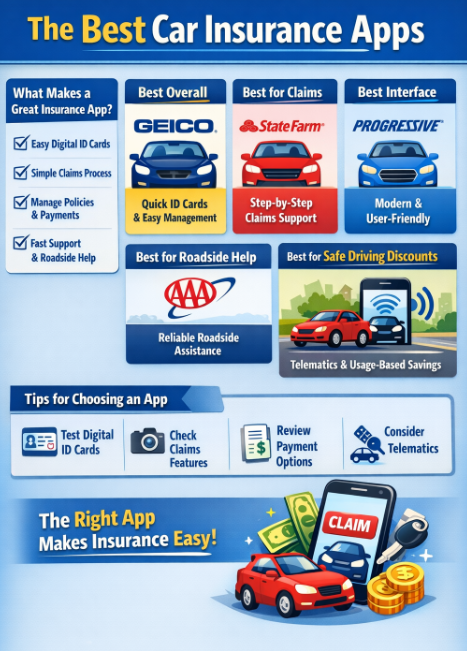
🥇 Best Overall: GEICO Mobile
- ⭐ Digital ID cards are easy to access and share.
- ⭐ Payments and autopay setup are straightforward.
- ⭐ Claims filing is fairly guided and doesn’t overwhelm you with unnecessary steps.
- ⭐ Policy documents and coverages are easy to find.
GEICO’s app consistently ranks as one of the most practical “do-everything” insurance apps. It’s strong in the areas that matter most: quick access to ID cards, billing, and a relatively streamlined claims setup. GEICO also tends to design for speed—fewer taps to get where you need to go, less clutter, and a layout that feels modern.
Best For
Drivers who want an app that covers the essentials without forcing them to dig around. If you value quick access to proof of insurance and simple policy management, GEICO is hard to beat.
Potential Downside
If you want deep in-app claim features like highly detailed tracking, repair scheduling, or fancy “concierge” experiences, GEICO’s experience is more functional than luxurious.
🏆 Best for Claims Experience: State Farm
- ⭐ Strong claims guidance and claim updates.
- ⭐ Useful accident support tools and documentation flow.
- ⭐ Good policy organization, especially for multi-policy households.
- ⭐ Easy support access.
State Farm’s app is often praised for its claims workflow and supportive tools. If you’re the kind of driver who wants an app that feels like it’s built around “what happens after the crash,” State Farm tends to do a strong job.
The app usually includes step-by-step guidance for claims, uploads, and communication, and it’s designed to reduce panic during stressful moments. It’s also a solid option if you like being able to access agents or support easily.
Best For
People who want reassurance and structure after an accident—especially families managing multiple drivers or policies.
Potential Downside
Some people prefer a leaner interface. Depending on your preferences, State Farm can feel “full-featured,” which sometimes means more menus than minimalists want.
✨ Best for a Modern, Clean Interface: Progressive
- ⭐ Smooth billing experience and clear policy info.
- ⭐ Strong self-service tools for managing coverage and documents.
- ⭐ Helpful digital workflows for common changes.
Progressive has one of the best car insurance apps. It’s app has a strong reputation for a clean user experience, especially for billing and policy management. Progressive also has a long history of telematics-based programs, and their app ecosystem tends to support a lot of self-service functionality.
Progressive is a great fit for drivers who like to tweak things: checking coverages, reviewing details, setting up payments, and handling common requests without calling.
Best For
Drivers who want control. If you’re the type who likes to handle things yourself instead of calling support, Progressive is a strong candidate.
Potential Downside
Telematics features can sometimes be separate or require additional setup. If you dislike driving tracking, you’ll want to make sure you understand what’s optional vs required for discounts.
🏠 Best for Multi-Policy Households: Allstate
- ⭐ Good document management across multiple policies.
- ⭐ Billing and payment options are easy to manage in one place.
- ⭐ Helpful policy overview for households with multiple coverage types.
If you bundle auto with renters, homeowners, or other policies, you want an app that makes managing everything simple. Allstate tends to serve multi-policy households well, with good organization and easy document access.
Allstate’s app experience often focuses on being a centralized “insurance hub” rather than a single-policy tool. That’s helpful when you’re managing a family’s insurance needs across cars and property.
Best For
Families, homeowners, and people with bundles who want everything in one place.
Potential Downside
The interface can feel more “corporate” than sleek. It’s usually functional and full-featured, but not always the fastest-feeling app.
🚨 Best for Roadside Assistance and Help-On-The-Go: AAA
- ⭐ Roadside requests are the main focus.
- ⭐ Service tracking can be a lifesaver when you’re stranded.
- ⭐ Membership tools and benefits are convenient if you use AAA frequently.
AAA isn’t a traditional “insurance company app” for everyone, but it deserves a spot here because many drivers rely on AAA for roadside help, towing, lockouts, flat tire assistance, and battery services. If roadside assistance is a major priority, AAA’s app functionality and service approach can be extremely valuable.
Best For
Drivers who travel, commute long distances, or simply want dependable roadside coverage with an app designed for urgent help.
Potential Downside
AAA’s insurance offerings vary by region and club. Depending on where you live, your insurance experience may not be as unified as a national carrier’s app.
Best for Discounts Based on Driving Behavior: Usage-Based (Telematics) Apps
If your top goal is lowering your premium, telematics apps can be a big deal—especially for safe drivers, low-mileage drivers, or people who mainly drive during daylight hours on predictable routes.
Many major insurers offer a telematics program that either lives inside their main app or uses a companion app. The general concept is similar: the app tracks driving behavior (like braking, acceleration, phone use, time of day, and mileage) and may reward safer patterns with discounts.
Which Telematics Apps are Best For
- Drivers with consistently safe habits.
- People who drive less than average.
- Remote workers or retirees with low annual mileage.
- Parents with new teen drivers who want insight and incentives.
Who Should Be Cautious
- People who drive at night often (work shifts, nightlife, long commutes).
- Drivers in heavy stop-and-go traffic where braking events are frequent.
- Anyone who dislikes phone tracking or worries about battery/data usage.
- People who sometimes use their phone while driving (even briefly).
How to Decide If It’s Worth It
If the insurer offers an estimated discount range and a clear explanation of what’s tracked, telematics can be worthwhile. But if the program is vague, or if you already know your driving environment forces lots of harsh stops, the discount may disappoint.
Best for Simple Digital Proof of Insurance: Most Major Carriers
Here’s something many drivers don’t realize: even if a carrier has a great app overall, the feature you’ll use most is usually the simplest one—digital ID cards.
The “best” insurance app for everyday life might be the one that loads your ID card quickly even when your phone signal is weak, lets you save it offline, and makes it easy to share with a spouse, teen driver, or police officer.
When you’re choosing an insurer, do this:
- Download the app before you commit (if possible).
- Look at screenshots in the app store.
- Confirm: Can you view ID cards without logging in repeatedly?
- Check if you can add the ID card to Apple Wallet or save it offline (if offered)
- Confirm: can you share a PDF of the card quickly?
This seems minor—until you’re on the side of the road trying to pull up proof of insurance.
Features that Separate “Good” Apps From Great Ones
If you want to spot a truly excellent insurance app, look for these high-value features:
Fast claim photo uploads ▼
Live claim tracking ▼
Repair shop support ▼
Roadside request tracking ▼
Easy policy changes ▼
Clear document center ▼
Security that isn’t painful ▼
How to Choose the Best Car Insurance App for You
Instead of chasing the “highest rated” app, choose based on your lifestyle:
If you’re always on the move ▼
If you’re worried about accidents and claims ▼
If you want to manage everything yourself ▼
If you want the lowest premium possible ▼
If you’re bundling multiple policies ▼
Common Problems with Insurance Apps (and How to Avoid Them)
Even the best apps can be annoying in a few predictable ways:
The app logs you out too often ▼
The claims status isn’t updating ▼
Telematics drains the battery or misreads trips ▼
You can’t complete a policy change ▼
The Final Take On the Best Auto Insurance Apps
When you’re calm at home, most insurance apps are fine. The real test is when you’re in a parking lot after a fender-bender, your hands are shaking, and you need to file a claim, upload photos, and find your ID card—fast.
If you want a reliable all-around experience, GEICO is often the safest bet for day-to-day ease. If you care most about claims guidance and communication, State Farm is a strong pick. If you prefer a modern interface with lots of self-service control, Progressive is a great fit. If bundling matters, Allstate can be a convenient hub. And if roadside is your lifeline, AAA deserves serious consideration.
The good news: you don’t need perfection. You need an app that makes the most common tasks – proof of insurance, payments, claims, and help – quick, clear, and frustration-free.